> ## Documentation Index
> Fetch the complete documentation index at: https://docs.seosorted.ai/llms.txt
> Use this file to discover all available pages before exploring further.
# Webhook
> Send every published article to your own HTTP endpoint, signed so you can verify it came from us.
The webhook connector POSTs a JSON payload to a URL you control whenever an article is published.
Use it for a headless CMS, a static site generator, an internal review queue, or any CMS we don't
support natively.
## Step 1 — Have an endpoint ready
You need a URL that accepts `POST` with a JSON body and answers with a `2xx` status. Anything
outside `200–299` counts as a failed delivery.
The endpoint must be reachable from the public internet. `localhost` works only while you are
testing against a local SeoSorted install.
## Step 2 — Connect
**Project Settings → Integrations → Webhook → Connect**.
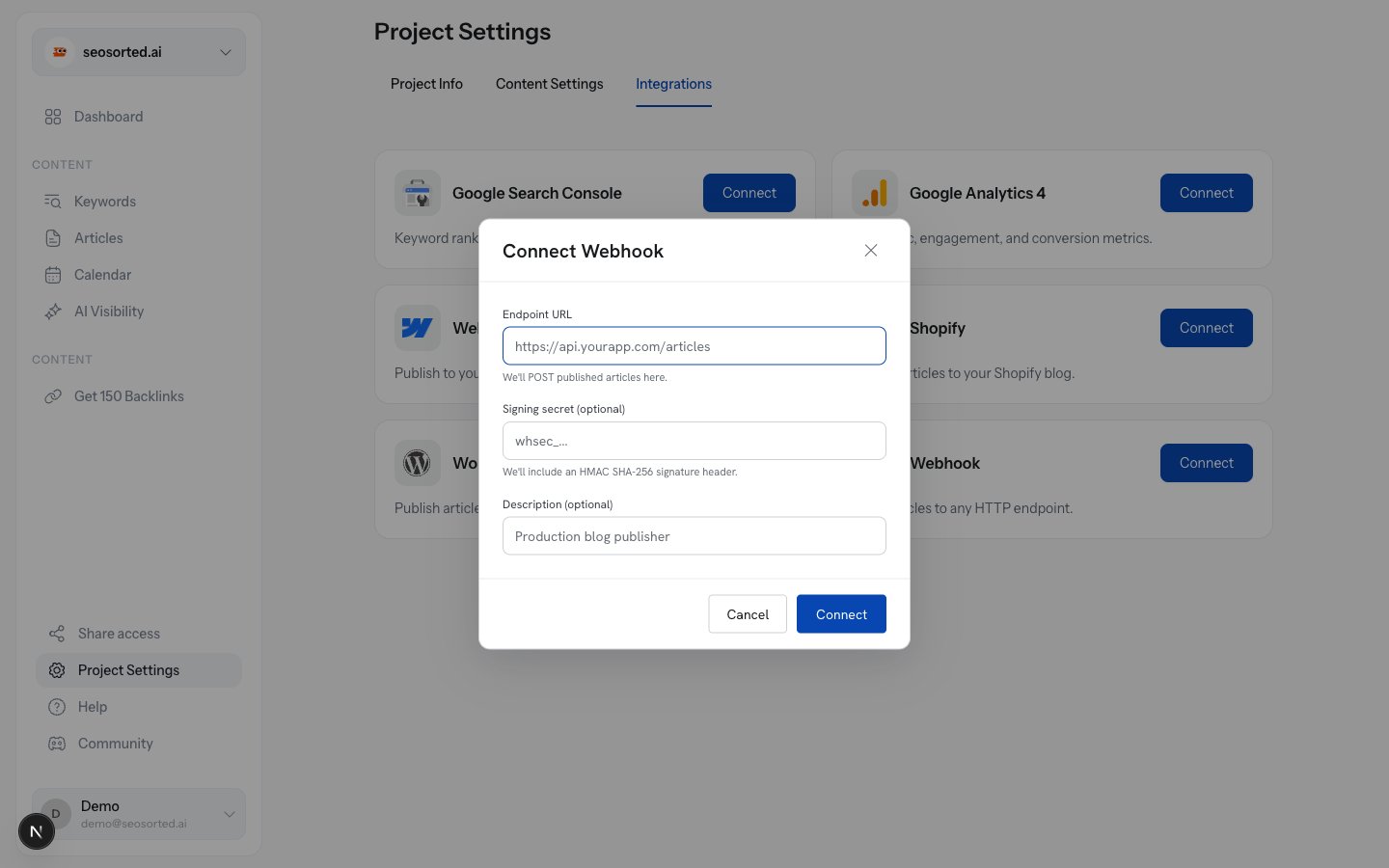 Where we POST, for example `https://api.yourapp.com/seosorted/articles`.
Optional. At least 16 characters. **Leave it blank and we generate one for you** — the usual
choice.
Optional label for your own reference, e.g. "Production blog publisher".
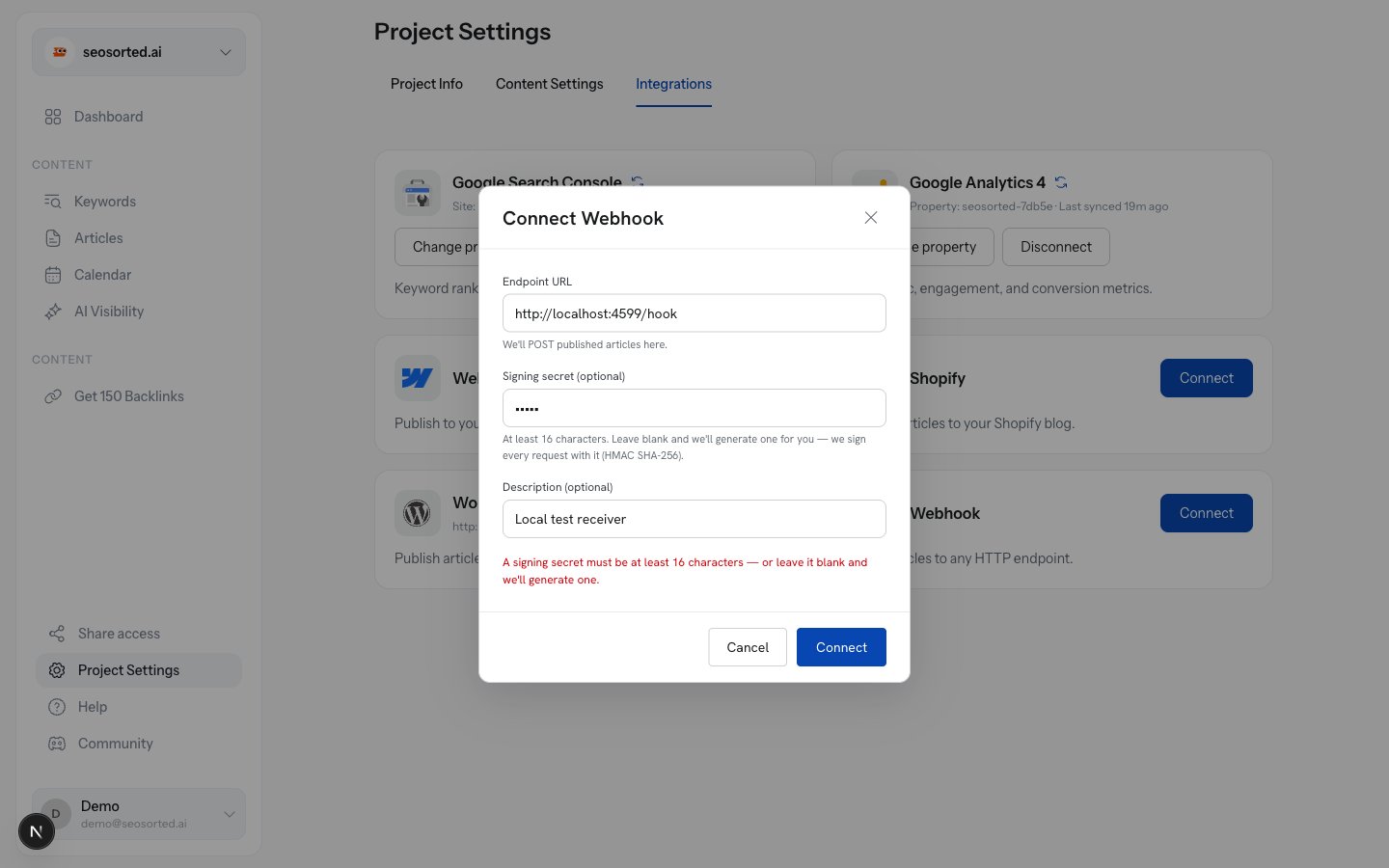
A secret shorter than 16 characters is rejected before anything is saved:
Where we POST, for example `https://api.yourapp.com/seosorted/articles`.
Optional. At least 16 characters. **Leave it blank and we generate one for you** — the usual
choice.
Optional label for your own reference, e.g. "Production blog publisher".
A secret shorter than 16 characters is rejected before anything is saved:
 ## Step 3 — Save the signing secret
If we generated the secret, it is shown once, immediately after connecting.
## Step 3 — Save the signing secret
If we generated the secret, it is shown once, immediately after connecting.
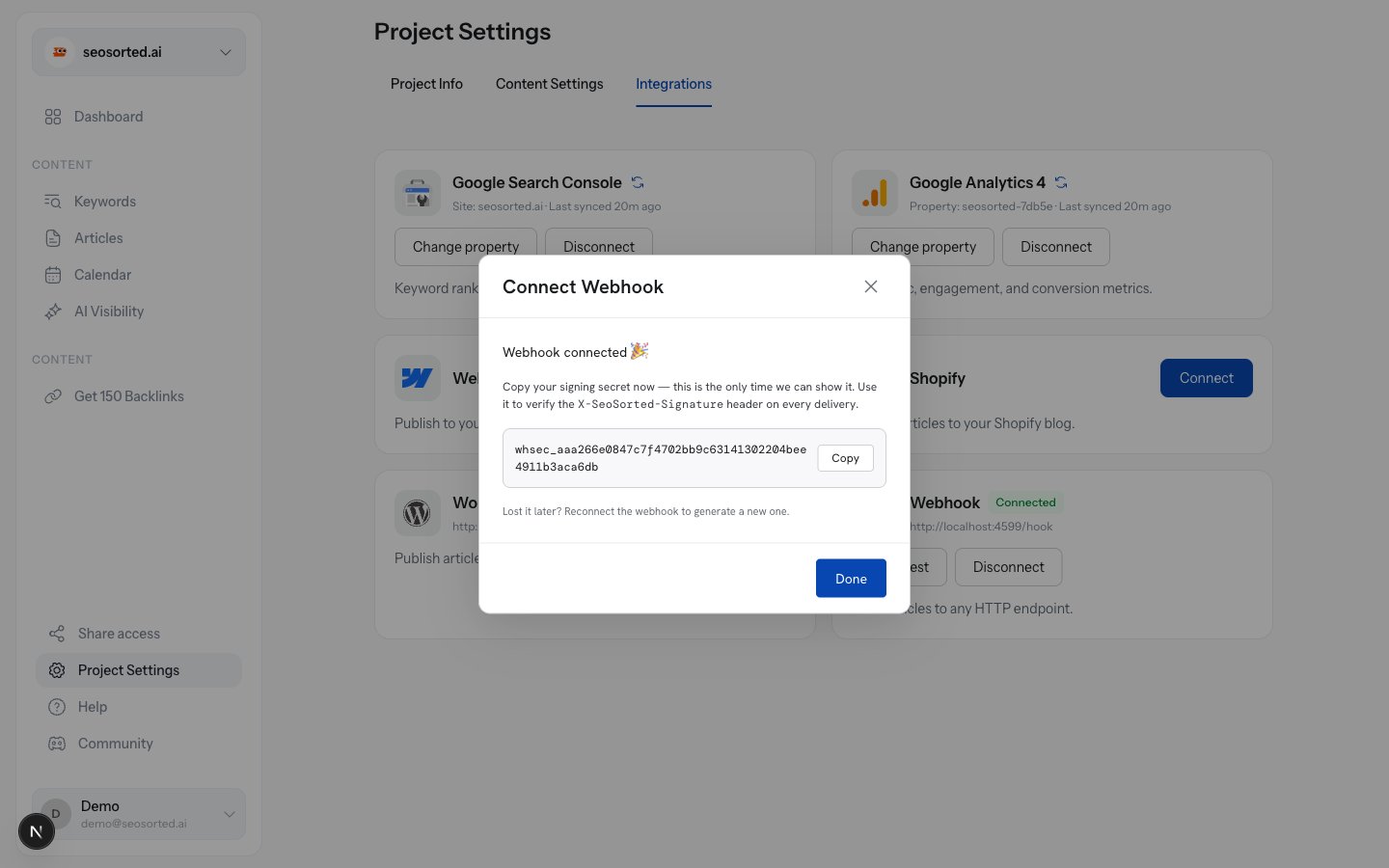 Store it in your app's secret manager before clicking **Done**. We keep it encrypted and cannot
show it again. Lost it? Reconnect the webhook to generate a new one, then update your endpoint.
## Step 4 — Send a test delivery
The connected card has a **Send test** button. It posts a `test` event with a realistic payload
and tells you exactly what your endpoint replied.
Store it in your app's secret manager before clicking **Done**. We keep it encrypted and cannot
show it again. Lost it? Reconnect the webhook to generate a new one, then update your endpoint.
## Step 4 — Send a test delivery
The connected card has a **Send test** button. It posts a `test` event with a realistic payload
and tells you exactly what your endpoint replied.
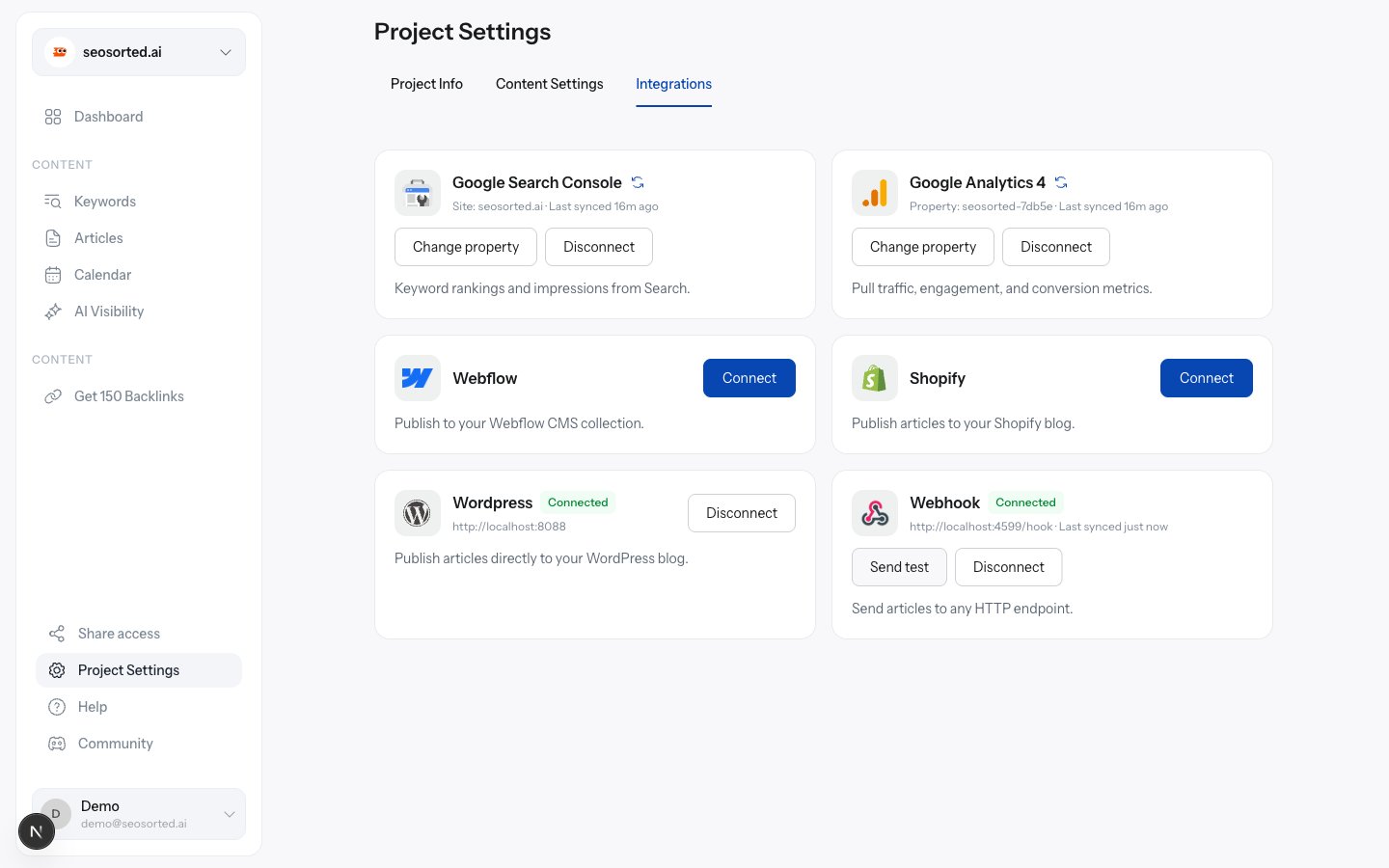 You'll see one of:
| Result | Meaning |
| ----------------------------------------------------------------- | ----------------------------------------------------- |
| `Test delivered — your endpoint replied 200 in 7ms.` | Working. |
| `Test failed: your endpoint replied 500` | Reached your server; it errored. Check your logs. |
| `Test failed: Connection refused by host — nothing is listening…` | Wrong port, or the service is down. |
| `Test failed: DNS lookup failed for host` | The hostname doesn't resolve publicly. |
| `Test failed: No response from host within 15s` | Answer faster — queue the work and reply immediately. |
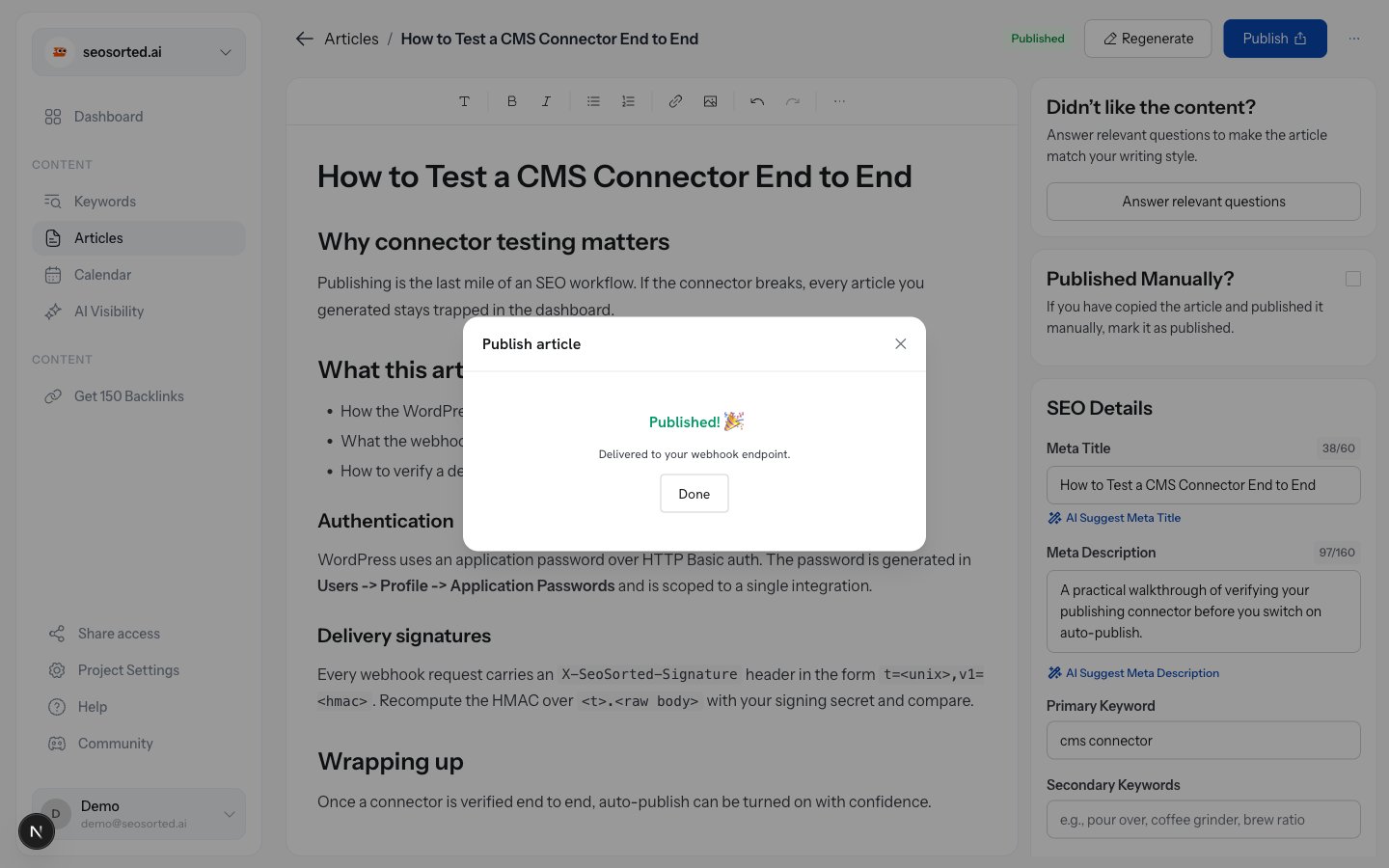
## Step 5 — Publish
Publish an article and choose **Webhook**. Because a webhook has no public URL to link to, success
is confirmed in place.
You'll see one of:
| Result | Meaning |
| ----------------------------------------------------------------- | ----------------------------------------------------- |
| `Test delivered — your endpoint replied 200 in 7ms.` | Working. |
| `Test failed: your endpoint replied 500` | Reached your server; it errored. Check your logs. |
| `Test failed: Connection refused by host — nothing is listening…` | Wrong port, or the service is down. |
| `Test failed: DNS lookup failed for host` | The hostname doesn't resolve publicly. |
| `Test failed: No response from host within 15s` | Answer faster — queue the work and reply immediately. |
## Step 5 — Publish
Publish an article and choose **Webhook**. Because a webhook has no public URL to link to, success
is confirmed in place.
 ## Verifying the signature
Every request carries these headers:
| Header | Example |
| ----------------------- | ------------------------------- |
| `X-SeoSorted-Signature` | `t=1786526112,v1=99ac6341579c…` |
| `X-SeoSorted-Event` | `article.published` |
| `X-SeoSorted-Delivery` | `cmspviqsp0003ura62z7x7oj3` |
The signature is an HMAC-SHA256 of `.` keyed with your signing secret, where
`t` is the Unix timestamp in the same header.
```ts Node.js theme={null}
import { createHmac, timingSafeEqual } from "node:crypto";
const TOLERANCE_S = 5 * 60;
export function verify(secret: string, rawBody: string, header: string): boolean {
const parts = Object.fromEntries(
header.split(",").map((p) => {
const [k, ...rest] = p.trim().split("=");
return [k, rest.join("=")];
}),
);
if (!parts.t || !parts.v1) return false;
// Reject replays of an old, previously valid request.
if (Math.abs(Date.now() / 1000 - Number(parts.t)) > TOLERANCE_S) return false;
const expected = createHmac("sha256", secret)
.update(`${parts.t}.${rawBody}`)
.digest("hex");
return timingSafeEqual(Buffer.from(parts.v1, "hex"), Buffer.from(expected, "hex"));
}
```
```python Python theme={null}
import hmac, hashlib, time
TOLERANCE_S = 5 * 60
def verify(secret: str, raw_body: bytes, header: str) -> bool:
parts = dict(p.strip().split("=", 1) for p in header.split(","))
t, v1 = parts.get("t"), parts.get("v1")
if not t or not v1:
return False
if abs(time.time() - int(t)) > TOLERANCE_S:
return False
expected = hmac.new(
secret.encode(), f"{t}.".encode() + raw_body, hashlib.sha256
).hexdigest()
return hmac.compare_digest(v1, expected)
```
```php PHP theme={null}
300) return false;
$expected = hash_hmac('sha256', $parts['t'] . '.' . $rawBody, $secret);
return hash_equals($parts['v1'], $expected);
}
```
Compute the HMAC over the **raw request body**, before any JSON parsing. Re-serializing the
parsed object changes the bytes and the signature will never match.
## Delivery behaviour
* **Timeout:** 15 seconds. Reply quickly and do the slow work asynchronously.
* **Retries:** deliveries are attempted once. A failure is recorded with the response status,
body and error so you can see what happened.
* **Health:** after 5 failed deliveries within an hour, the connector is marked **Error** on the
Integrations tab.
* **Duplicates:** use `X-SeoSorted-Delivery` as an idempotency key.
See the [payload reference](/connectors/webhook-payload) for the exact JSON body.
## Verifying the signature
Every request carries these headers:
| Header | Example |
| ----------------------- | ------------------------------- |
| `X-SeoSorted-Signature` | `t=1786526112,v1=99ac6341579c…` |
| `X-SeoSorted-Event` | `article.published` |
| `X-SeoSorted-Delivery` | `cmspviqsp0003ura62z7x7oj3` |
The signature is an HMAC-SHA256 of `.` keyed with your signing secret, where
`t` is the Unix timestamp in the same header.
```ts Node.js theme={null}
import { createHmac, timingSafeEqual } from "node:crypto";
const TOLERANCE_S = 5 * 60;
export function verify(secret: string, rawBody: string, header: string): boolean {
const parts = Object.fromEntries(
header.split(",").map((p) => {
const [k, ...rest] = p.trim().split("=");
return [k, rest.join("=")];
}),
);
if (!parts.t || !parts.v1) return false;
// Reject replays of an old, previously valid request.
if (Math.abs(Date.now() / 1000 - Number(parts.t)) > TOLERANCE_S) return false;
const expected = createHmac("sha256", secret)
.update(`${parts.t}.${rawBody}`)
.digest("hex");
return timingSafeEqual(Buffer.from(parts.v1, "hex"), Buffer.from(expected, "hex"));
}
```
```python Python theme={null}
import hmac, hashlib, time
TOLERANCE_S = 5 * 60
def verify(secret: str, raw_body: bytes, header: str) -> bool:
parts = dict(p.strip().split("=", 1) for p in header.split(","))
t, v1 = parts.get("t"), parts.get("v1")
if not t or not v1:
return False
if abs(time.time() - int(t)) > TOLERANCE_S:
return False
expected = hmac.new(
secret.encode(), f"{t}.".encode() + raw_body, hashlib.sha256
).hexdigest()
return hmac.compare_digest(v1, expected)
```
```php PHP theme={null}
300) return false;
$expected = hash_hmac('sha256', $parts['t'] . '.' . $rawBody, $secret);
return hash_equals($parts['v1'], $expected);
}
```
Compute the HMAC over the **raw request body**, before any JSON parsing. Re-serializing the
parsed object changes the bytes and the signature will never match.
## Delivery behaviour
* **Timeout:** 15 seconds. Reply quickly and do the slow work asynchronously.
* **Retries:** deliveries are attempted once. A failure is recorded with the response status,
body and error so you can see what happened.
* **Health:** after 5 failed deliveries within an hour, the connector is marked **Error** on the
Integrations tab.
* **Duplicates:** use `X-SeoSorted-Delivery` as an idempotency key.
See the [payload reference](/connectors/webhook-payload) for the exact JSON body.