

Before you start
- The site must have the Wix Blog app installed (Add Apps → Wix Blog).
- You need to be the site owner, or a co-owner of the Wix account that owns the site.
Step 1 — Create an API key
- Go to manage.wix.com/account/api-keys and click Generate API Key.
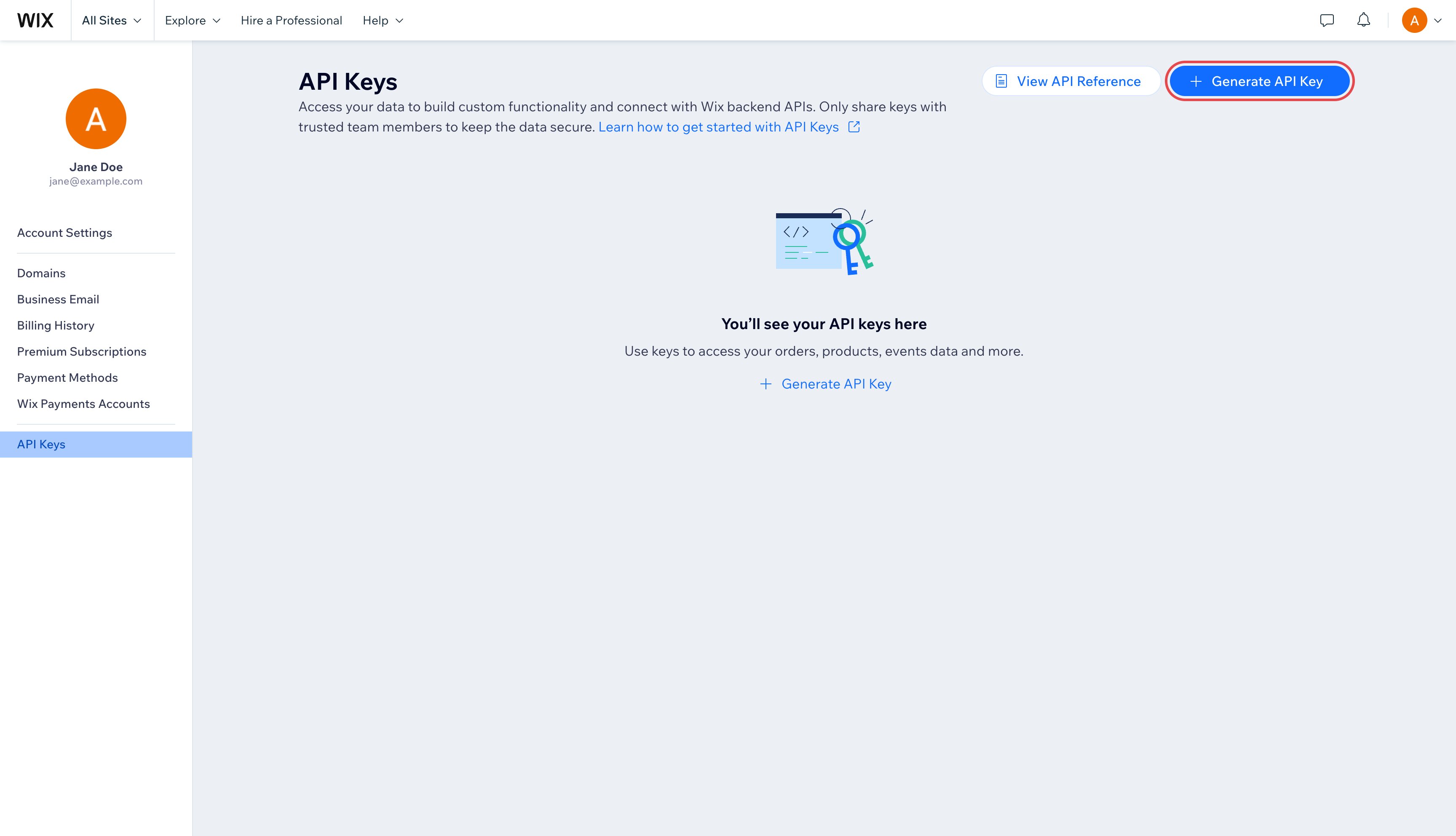
Account → API Keys → Generate API Key
- Name it SEOsorted. Under Sites, choose Specific sites and click Add sites.
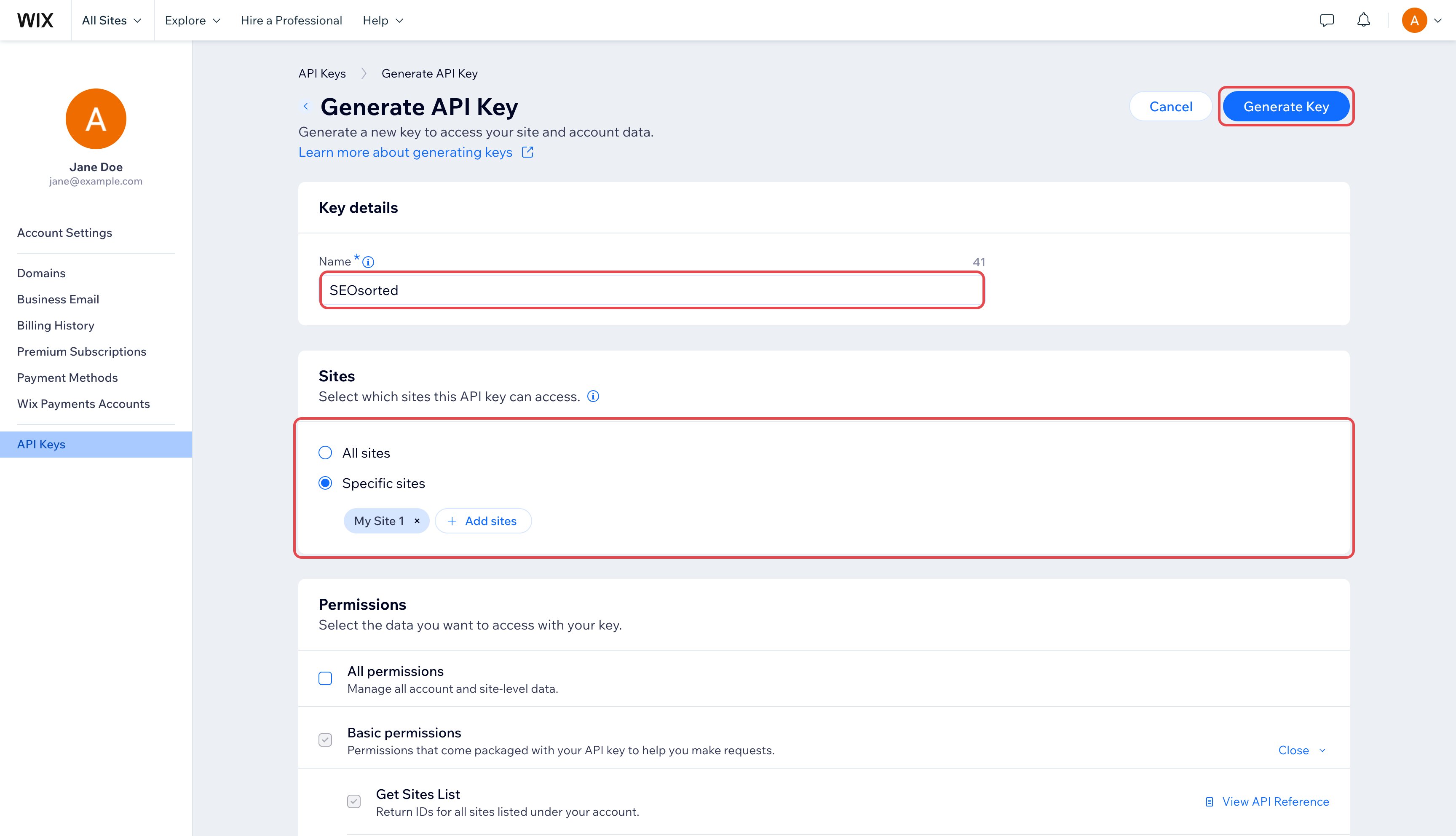
Name the key and limit it to your site
- Tick the site you publish to and click Add.

Pick your site
- Under Permissions → All site permissions, tick Wix Blog, Manage Site Media and Wix Contacts & Members. Leave everything else unticked.

Tick Wix Blog, Manage Site Media and Wix Contacts & Members
- Click Generate Key. Wix emails you a 6-digit code to confirm it’s you — click Send Code, then enter the code.

Wix verifies your account before creating the key
- Click Copy token. The key starts with
IST.and is shown only once.

Copy the token — Wix won't show it again
Step 2 — Copy the Site ID
Open the site’s dashboard in Wix. The address looks likehttps://manage.wix.com/dashboard/1a2b3c4d-1234-5678-9abc-1234567890ab/home — copy the whole
address; we pick the Site ID out of it.
Step 3 — Connect in SeoSorted
Project Settings → Integrations → Wix → Connect.
Connecting a Wix site
string
required
The dashboard URL from step 2, or the bare Site ID.
string
required
The key from step 1. Stored encrypted.
What we write
Posts are created published. Until the Wix site itself is published, posts have no public
address, so the publish dialog has no View article link yet.
Republishing, unpublishing and deleting
- Re-publish updates the same Wix post in place. If the post was deleted in Wix, a new one is created.
- Unpublish reverts the post to a draft in Wix. Publishing again after an unpublish creates a new post.
- Deleting the article in SeoSorted moves the Wix post to the blog’s trash, where you can still restore it.
Common problems
“Wix refused the request…”
“Wix refused the request…”
The key was copied incompletely, has expired, or lacks a permission. Generate a new key with
Wix Blog, Manage Site Media and Wix Contacts & Members, for the site you’re
connecting.
“Wix rejected that API key”
“Wix rejected that API key”
The key was deleted in Wix. Generate a new one and reconnect.
“Wix couldn't find a blog on that site”
“Wix couldn't find a blog on that site”
The site doesn’t have the Wix Blog app. Add it from Add Apps → Wix Blog, then connect again.
“Paste your site's dashboard URL or its Site ID…”
“Paste your site's dashboard URL or its Site ID…”
Copy the address from the site’s dashboard — it contains a long id like
1a2b3c4d-1234-5678-9abc-1234567890ab. The site’s public address (mysite.wixsite.com) is not
the Site ID.An image is missing from the post
An image is missing from the post
Wix could not import that image from its URL (for example, the host blocks downloads). The rest
of the post is published; replace the image in the Wix editor.